
Claude Code as an Orchestrator
Claude Code as an Orchestrator
Vidhan Mertiya

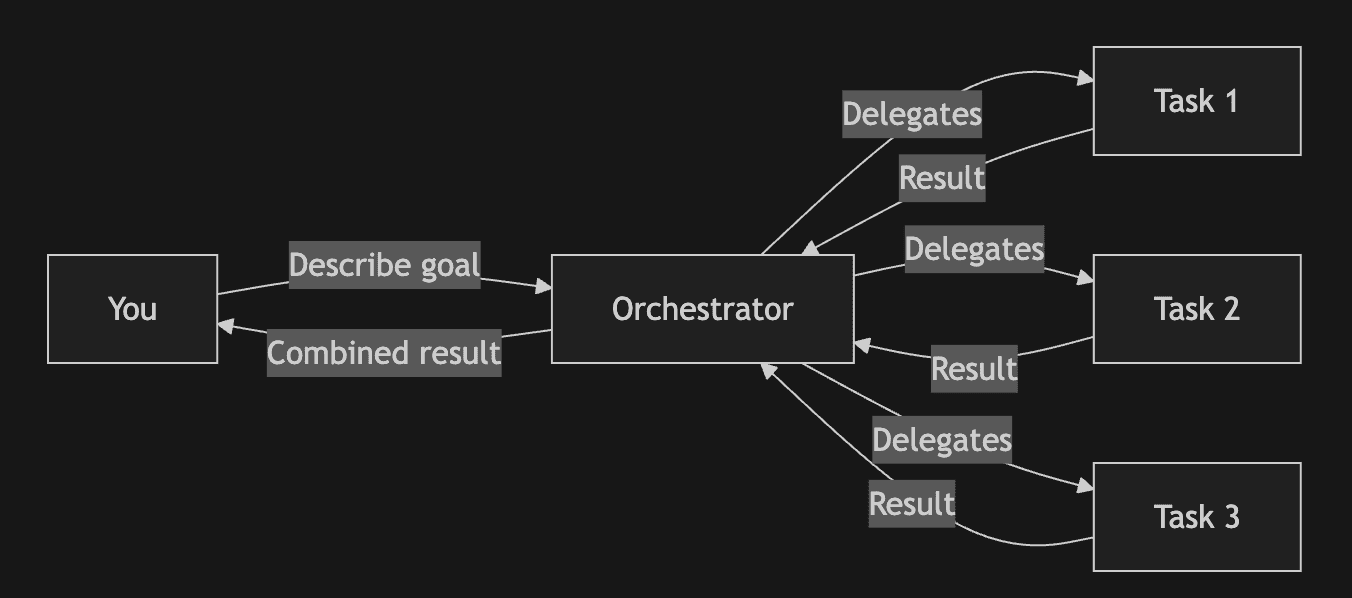
You describe what you want. Claude figures out how to do it.
That's the core promise of using Claude Code as an orchestrator. Instead of manually running commands, reviewing outputs, and deciding next steps, you delegate that entire loop to an AI that can coordinate complex workflows autonomously.
I've been exploring this approach extensively, and in this post, I'll share what I've learned about orchestration with Claude Code—what it means, how it works, and when you should (and shouldn't) use it.
Table of Contents
The Problem
What is Claude Code?
The Building Blocks
Orchestration Patterns
When NOT to Use This
The Problem
Situation: Here's a workflow you've probably experienced. I know I have.
I've spent countless hours stuck in this loop. Now imagine saying: "Fix all failing tests, commit when green, and open a PR." Claude Code handles the loop. You review the result.
That shift—from executing each step to defining the goal—is what orchestration enables. And once you experience it, there's no going back.
What is Claude Code?
If you're not familiar: Claude Code is Anthropic's command-line tool for working with AI. Unlike IDE extensions that suggest code as you type, Claude Code operates at a higher level:
It reads your codebase to understand context
It executes commands in your terminal
It edits files across your project
It manages git workflows
The key difference: The orchestrator doesn't just write code. It decides what to do, does it, checks if it worked, and adapts.
Think of it as the difference between autocomplete and delegation.
The Orchestrator Mental Model
The mental model that helped me the most was thinking of Claude Code as a project manager with coding skills.
How Orchestration Works:
You define the goal
The orchestrator breaks it down into subtasks
Delegates subtasks (sometimes in parallel)
Collects results
Synthesizes them into a final output
Why this is powerful:
Parallel execution - Multiple tasks run simultaneously
Context isolation - Each subtask only sees what it needs
Adaptive flow - The orchestrator adjusts based on intermediate results
The Building Blocks
Claude Code provides five mechanisms for orchestration:
1. Subagents
Subagents are specialized Claude instances spawned for focused tasks. They run independently and return results to the main session.
Built-in Types:
Explore: Fast codebase search (read-only)
Plan: Design implementation strategies
Bash: Execute terminal commands
General: Handle complex multi-step tasks
Use when: You need parallel research, isolated context, or specialized focus.
Limitation: Subagents cannot spawn their own subagents. One level of delegation only—something to keep in mind when designing your workflows.
2. Custom Agents
Use when: You have recurring specialized tasks (security review, documentation, testing) that benefit from consistent instructions.
Some agents I've found useful:
A security reviewer that only has read access
A test runner that can execute but not edit
A documentation writer focused on API specs
3. Hooks
Hooks are automated actions triggered at specific moments in Claude's workflow.
Available Hooks:
PreToolUse: Before any tool runs (safety checks)
PostToolUse: After tool completes (formatting, linting)
Stop: When Claude finishes (logging, notifications)
SessionStart: When session begins (environment setup)
Use when: You want guardrails (block dangerous commands) or automation (auto-format after edits).
These are great for building safety nets into your workflows.
4. Skills / Slash Commands
Skills are reusable prompts you invoke with /command-name. They're stored as markdown files in your project.
Use when: You have workflows you run frequently (PR reviews, deployment checks, documentation generation).
Skills I use regularly:
/review-pr: Structured code review with security focus
/fix-tests: Find and fix all failing tests
/document: Generate API documentation
5. Claude Agent SDK
For production systems or complex automation, the Agent SDK lets you build custom agents programmatically.
Use when: You need agents running in CI/CD, as background services, or with custom tool integrations.
This is on my list to explore more thoroughly.
Orchestration Patterns
These describe how to structure workflows using the building blocks above.
Pattern 1: Plan → Execute → Verify
Sequential workflow with validation gates.
Flow:
Plan Phase: Design approach
Human Review: Review the plan
Execute Phase: Implement
Verify Phase: Tests run
If tests pass: Done
If tests fail: Return to Execute
Best for: Critical changes where you want checkpoints before major actions. This is my default for anything touching production code.
Pattern 2: Parallel Workers
Multiple agents work simultaneously on independent tasks.
Flow:
Main Orchestrator delegates to:
Worker 1 (Security)
Worker 2 (Performance)
Worker 3 (Tests)
All workers complete
Results combined into report
Best for: Comprehensive analysis where different perspectives can run in parallel. I love this pattern for code reviews—you get multiple angles at once.
Pattern 3: Pipeline
Each step feeds into the next, like a CI/CD pipeline.
Flow: Index Codebase → Research Patterns → Generate Plan → Implement → Review
Best for: Predictable, repeatable workflows where steps have clear dependencies.
Pattern 4: Autonomous Loop (Ralph Wiggum)
This is the pattern that really opened my eyes to what's possible.
Named after the Simpsons character who embodies persistent iteration despite setbacks, Ralph Wiggum is a technique for running Claude Code autonomously for hours, not minutes.
The core idea: A while-true loop that repeatedly feeds the same prompt until the task is complete.
How it works:
You provide a prompt with a clear completion promise (e.g., "Output DONE when all tests pass")
Claude works on the task and commits changes
When Claude tries to exit, a Stop hook intercepts
If the completion promise isn't found, the same prompt is re-fed
Claude sees its previous work via git history and modified files
Loop continues until completion or iteration limit
Key insight: The prompt never changes, but each iteration sees the cumulative work. Claude essentially debugs and improves its own previous attempts.
Real-world results:
CURSED: A complete programming language with LLVM compiler, built over 3 months using Ralph loops
YC hackathon teams: Shipped 6 repos overnight for $297 in API costs
Contract delivery: A $50k contract delivered for $297 using this technique
Requirements:
Clear completion promise in the prompt
Automatic verification (tests, linters, type checks)
Always set --max-iterations as a safety net
Not suitable for:
Ambiguous requirements
Tasks requiring human judgment
Security-sensitive changes
A Real Workflow
Let me trace through a realistic example to show how these pieces fit together.
Scenario: "Review and improve error handling in the API module."
Step 1 - Research (Parallel Subagents):
Claude spawns Explore agents to:
Find all error handling patterns in the codebase
Identify inconsistencies or missing cases
Check how errors are logged and monitored
Step 2 - Analysis (Main Session):
Results are synthesized:
12 endpoints found
3 use custom error classes, 9 use generic errors
No consistent logging format
Two endpoints don't handle database timeouts
Step 3 - Planning:
A plan is generated:
Standardize on custom error classes
Add timeout handling to the two endpoints
Implement consistent error logging format
Step 4 - Human Checkpoint:
You review the plan. Approve, modify, or reject. This is where you stay in control.
Step 5 - Execution:
If approved, Claude implements changes across the affected files.
Step 6 - Verification:
Tests run automatically. If failures occur, Claude attempts fixes before reporting back.
The whole thing feels like having a junior developer who never gets tired.
When NOT to Use This
I want to be honest: orchestration isn't always the right choice. I've learned this the hard way.
Situations where you should NOT use orchestration:
Exploratory debugging: You need to think through the problem, not delegate it
Learning a new codebase: Reading code yourself builds understanding
Critical production changes: Keep humans closely in the loop
Ambiguous requirements: If you can't define the goal clearly, Claude can't achieve it
The best use cases have clear goals and predictable workflows. Open-ended exploration benefits from human judgment.
Know when to step back into the driver's seat.
Appendix
Resources
Official Documentation:
Claude Code Overview
Subagents Documentation
Hooks Reference
Agent SDK
Ralph Wiggum Plugin
Community:
Claude Code GitHub
Anthropic Engineering Blog
Videos:
Ralph Wiggum Technique Explained
Further Reading:
Building Agents with Claude Agent SDK
Claude Code Best Practices
Multi-Agent Orchestration Patterns
The Ralph Wiggum Approach
Have questions or want to share your own orchestration workflows? I'd love to hear from you. You can find me on Twitter or open a discussion on the Claude Code GitHub. (https://github.com/anthropics/claude-code)
You describe what you want. Claude figures out how to do it.
That's the core promise of using Claude Code as an orchestrator. Instead of manually running commands, reviewing outputs, and deciding next steps, you delegate that entire loop to an AI that can coordinate complex workflows autonomously.
I've been exploring this approach extensively, and in this post, I'll share what I've learned about orchestration with Claude Code—what it means, how it works, and when you should (and shouldn't) use it.
Table of Contents
The Problem
What is Claude Code?
The Building Blocks
Orchestration Patterns
When NOT to Use This
The Problem
Situation: Here's a workflow you've probably experienced. I know I have.
I've spent countless hours stuck in this loop. Now imagine saying: "Fix all failing tests, commit when green, and open a PR." Claude Code handles the loop. You review the result.
That shift—from executing each step to defining the goal—is what orchestration enables. And once you experience it, there's no going back.
What is Claude Code?
If you're not familiar: Claude Code is Anthropic's command-line tool for working with AI. Unlike IDE extensions that suggest code as you type, Claude Code operates at a higher level:
It reads your codebase to understand context
It executes commands in your terminal
It edits files across your project
It manages git workflows
The key difference: The orchestrator doesn't just write code. It decides what to do, does it, checks if it worked, and adapts.
Think of it as the difference between autocomplete and delegation.
The Orchestrator Mental Model
The mental model that helped me the most was thinking of Claude Code as a project manager with coding skills.
How Orchestration Works:
You define the goal
The orchestrator breaks it down into subtasks
Delegates subtasks (sometimes in parallel)
Collects results
Synthesizes them into a final output
Why this is powerful:
Parallel execution - Multiple tasks run simultaneously
Context isolation - Each subtask only sees what it needs
Adaptive flow - The orchestrator adjusts based on intermediate results
The Building Blocks
Claude Code provides five mechanisms for orchestration:
1. Subagents
Subagents are specialized Claude instances spawned for focused tasks. They run independently and return results to the main session.
Built-in Types:
Explore: Fast codebase search (read-only)
Plan: Design implementation strategies
Bash: Execute terminal commands
General: Handle complex multi-step tasks
Use when: You need parallel research, isolated context, or specialized focus.
Limitation: Subagents cannot spawn their own subagents. One level of delegation only—something to keep in mind when designing your workflows.
2. Custom Agents
Use when: You have recurring specialized tasks (security review, documentation, testing) that benefit from consistent instructions.
Some agents I've found useful:
A security reviewer that only has read access
A test runner that can execute but not edit
A documentation writer focused on API specs
3. Hooks
Hooks are automated actions triggered at specific moments in Claude's workflow.
Available Hooks:
PreToolUse: Before any tool runs (safety checks)
PostToolUse: After tool completes (formatting, linting)
Stop: When Claude finishes (logging, notifications)
SessionStart: When session begins (environment setup)
Use when: You want guardrails (block dangerous commands) or automation (auto-format after edits).
These are great for building safety nets into your workflows.
4. Skills / Slash Commands
Skills are reusable prompts you invoke with /command-name. They're stored as markdown files in your project.
Use when: You have workflows you run frequently (PR reviews, deployment checks, documentation generation).
Skills I use regularly:
/review-pr: Structured code review with security focus
/fix-tests: Find and fix all failing tests
/document: Generate API documentation
5. Claude Agent SDK
For production systems or complex automation, the Agent SDK lets you build custom agents programmatically.
Use when: You need agents running in CI/CD, as background services, or with custom tool integrations.
This is on my list to explore more thoroughly.
Orchestration Patterns
These describe how to structure workflows using the building blocks above.
Pattern 1: Plan → Execute → Verify
Sequential workflow with validation gates.
Flow:
Plan Phase: Design approach
Human Review: Review the plan
Execute Phase: Implement
Verify Phase: Tests run
If tests pass: Done
If tests fail: Return to Execute
Best for: Critical changes where you want checkpoints before major actions. This is my default for anything touching production code.
Pattern 2: Parallel Workers
Multiple agents work simultaneously on independent tasks.
Flow:
Main Orchestrator delegates to:
Worker 1 (Security)
Worker 2 (Performance)
Worker 3 (Tests)
All workers complete
Results combined into report
Best for: Comprehensive analysis where different perspectives can run in parallel. I love this pattern for code reviews—you get multiple angles at once.
Pattern 3: Pipeline
Each step feeds into the next, like a CI/CD pipeline.
Flow: Index Codebase → Research Patterns → Generate Plan → Implement → Review
Best for: Predictable, repeatable workflows where steps have clear dependencies.
Pattern 4: Autonomous Loop (Ralph Wiggum)
This is the pattern that really opened my eyes to what's possible.
Named after the Simpsons character who embodies persistent iteration despite setbacks, Ralph Wiggum is a technique for running Claude Code autonomously for hours, not minutes.
The core idea: A while-true loop that repeatedly feeds the same prompt until the task is complete.
How it works:
You provide a prompt with a clear completion promise (e.g., "Output DONE when all tests pass")
Claude works on the task and commits changes
When Claude tries to exit, a Stop hook intercepts
If the completion promise isn't found, the same prompt is re-fed
Claude sees its previous work via git history and modified files
Loop continues until completion or iteration limit
Key insight: The prompt never changes, but each iteration sees the cumulative work. Claude essentially debugs and improves its own previous attempts.
Real-world results:
CURSED: A complete programming language with LLVM compiler, built over 3 months using Ralph loops
YC hackathon teams: Shipped 6 repos overnight for $297 in API costs
Contract delivery: A $50k contract delivered for $297 using this technique
Requirements:
Clear completion promise in the prompt
Automatic verification (tests, linters, type checks)
Always set --max-iterations as a safety net
Not suitable for:
Ambiguous requirements
Tasks requiring human judgment
Security-sensitive changes
A Real Workflow
Let me trace through a realistic example to show how these pieces fit together.
Scenario: "Review and improve error handling in the API module."
Step 1 - Research (Parallel Subagents):
Claude spawns Explore agents to:
Find all error handling patterns in the codebase
Identify inconsistencies or missing cases
Check how errors are logged and monitored
Step 2 - Analysis (Main Session):
Results are synthesized:
12 endpoints found
3 use custom error classes, 9 use generic errors
No consistent logging format
Two endpoints don't handle database timeouts
Step 3 - Planning:
A plan is generated:
Standardize on custom error classes
Add timeout handling to the two endpoints
Implement consistent error logging format
Step 4 - Human Checkpoint:
You review the plan. Approve, modify, or reject. This is where you stay in control.
Step 5 - Execution:
If approved, Claude implements changes across the affected files.
Step 6 - Verification:
Tests run automatically. If failures occur, Claude attempts fixes before reporting back.
The whole thing feels like having a junior developer who never gets tired.
When NOT to Use This
I want to be honest: orchestration isn't always the right choice. I've learned this the hard way.
Situations where you should NOT use orchestration:
Exploratory debugging: You need to think through the problem, not delegate it
Learning a new codebase: Reading code yourself builds understanding
Critical production changes: Keep humans closely in the loop
Ambiguous requirements: If you can't define the goal clearly, Claude can't achieve it
The best use cases have clear goals and predictable workflows. Open-ended exploration benefits from human judgment.
Know when to step back into the driver's seat.
Appendix
Resources
Official Documentation:
Claude Code Overview
Subagents Documentation
Hooks Reference
Agent SDK
Ralph Wiggum Plugin
Community:
Claude Code GitHub
Anthropic Engineering Blog
Videos:
Ralph Wiggum Technique Explained
Further Reading:
Building Agents with Claude Agent SDK
Claude Code Best Practices
Multi-Agent Orchestration Patterns
The Ralph Wiggum Approach
Have questions or want to share your own orchestration workflows? I'd love to hear from you. You can find me on Twitter or open a discussion on the Claude Code GitHub. (https://github.com/anthropics/claude-code)